
A conversation with your team
The widget lives on your website, messages arrive in your Inbox. Meet AI and Copilot follow your website configuration.
Meetlead + WordPress
Add Meetlead without editing your theme. Connect WordPress with a one-time code and help customers with the context of their visit.
Free Starter plan. No credit card required.Explore the product in a demo tailored to your business.
 WordPressWidgetInbox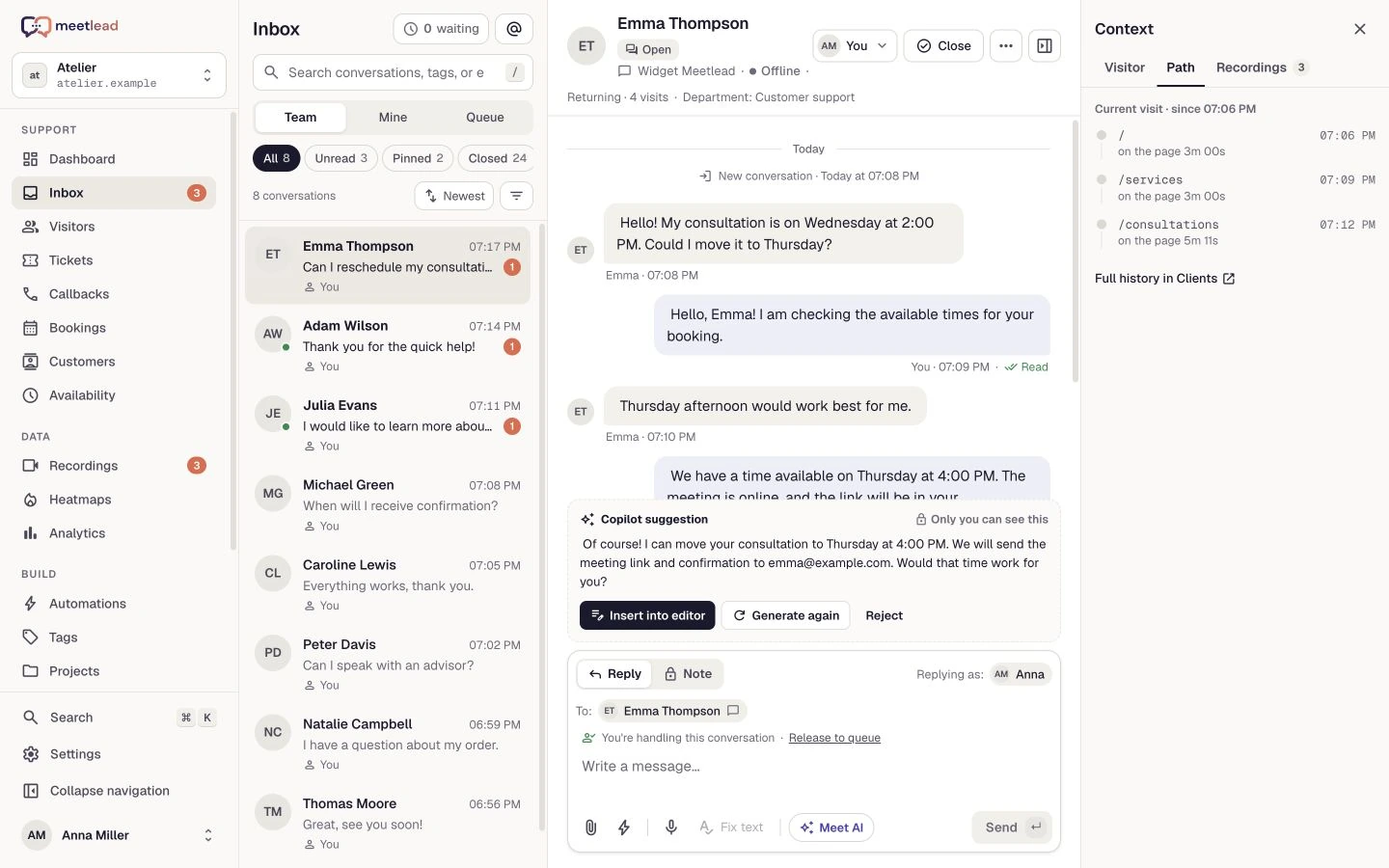
The plugin connects WordPress to Meetlead. Your team keeps working in one panel.
How it works and dataInstall and connect
A Meetlead account, a website in the panel and an active WordPress App. Connect each multisite subsite separately.
No manual script insertion into your theme. The connection is tied to the selected hostname.
Ask us about access to the Meetlead Live Chat package. Upload the ZIP in WordPress under Plugins → Add New → Upload Plugin. Activation alone does not contact Meetlead or create an account.
Request the pluginSelect your website, install the WordPress App and generate a one-time code for an allowed hostname. Administrator permissions are required.
In WordPress, open Settings → Meetlead. Review the external-service notice, choose a consent mode and enter the pairing code.
Clear page and CDN cache. Open a public page in a private window, check the consent mode and send a test message to the Inbox.
One platform
The plugin adds the widget. Available capabilities depend on your plan, active Apps and website settings.
The widget lives on your website, messages arrive in your Inbox. Meet AI and Copilot follow your website configuration.
Offer published help-center articles and forms for active booking offers inside the widget.
Use active analytics, heatmaps and recordings according to your plan, configuration and consent mode.
Connection settings
Three real modes in the plugin settings. Your choice affects widget loading and enabled telemetry.
The administrator is responsible for the lawful basis and visitor notice. The plugin preserves existing choices during updates.
Your CMP can pass state through meetlead:consent. This example enables functional chat while leaving analytics disabled.
window.dispatchEvent(new CustomEvent('meetlead:consent', {
  detail: { functional: true, analytics: false }
}));
How it works and privacy
Full information about external services, data, consent and the plugin lifecycle. Also available without JavaScript.
Meetlead Live Chat installs the Meetlead widget on a WordPress website without requiring manual theme edits. The plugin is a connector to the external Meetlead SaaS and does not provide a local chat service by itself. It requires a Meetlead account, a Website configured in the panel and an active WordPress Application.
Activating the plugin does not create an account or contact Meetlead. The first connection occurs only after an administrator deliberately accepts the external-service notice and submits a one-time pairing code.
The PHP code, local JavaScript loader and other files distributed through WordPress.org are licensed under GPL-2.0-or-later. The remote widget is an integral part of the Meetlead service runtime; it is not used to update plugin code, install add-ons or download premium versions.
The plugin connects to https://api.meetlead.eu to exchange a one-time code for connection data, revoke a connection, retrieve widget configuration, handle chat communication and accept permitted functional or analytics data. It connects to https://widget.meetlead.eu to load the widget, recorder and heatmap collector, and may asynchronously load interface fonts from https://meetlead.eu/fonts when the browser supports FontFace.
These services are operated by GESEL.IO sp. z o.o., the operator and owner of Meetlead. We do not sell visitor data or use plugin connections for advertising. SaaS use is governed by the Terms of Service and data processing by the Privacy Policy.
During pairing, the plugin sends the one-time code, WordPress home URL, a random plugin-instance identifier, plugin version, WordPress version and integration-contract version to the API. The server also receives the request IP address. The plugin does not send the WordPress administrator account, installed plugin or theme lists, or post content.
Only information required to maintain and safely revoke the connection is stored locally in WordPress options. Visitor profiles, conversations, attachments, recordings and heatmaps are not stored by the plugin in WordPress.
After the widget starts, it may send the visitor IP address and user agent, current page and referrer, visitor identifier, secure session-resume data, chat and form content, and uploaded files to Meetlead. Depending on configuration and consent, it may also send page events, goals, clicks, DOM snapshots, heatmaps and session recordings.
The default load_immediately mode starts chat, presence and enabled analytics without waiting for a cookie-banner decision. If heatmaps or recordings are enabled in Meetlead, they may also start immediately. The administrator selects this mode during pairing and is responsible for the appropriate legal basis and visitor notice.
The wait_for_consent mode integrates with the WordPress Consent API and does not download the widget before functional consent. The retained load_chat_immediately mode starts chat immediately and analytics only after consent. Another CMP may provide the current state before the loader or dispatch a meetlead:consent event with functional and analytics values. Installing or configuring the plugin does not by itself guarantee legal compliance.
The plugin adds suggested wording to the WordPress Privacy Policy Guide. It must be adapted to the website’s actual settings, retention periods and controller contact details.
Deactivation stops the widget from loading but keeps local connection settings for later activation. Disconnecting in plugin settings disables the widget locally and attempts to revoke the Meetlead connection; when the API is unavailable, only the minimum revocation data remains for a safe retry.
Deleting the plugin removes all local settings and secrets and makes a time-limited, best-effort remote revocation attempt. The administrator should then verify the integration status in Meetlead. Uninstalling the WordPress Application in Meetlead removes pairing codes, connections and integration credentials, while conversation history, contacts, recordings, audit and usage follow service retention.
Deleting the Meetlead account or submitting a verified request is required to remove remaining remote data, subject to legal retention and pseudonymized audit exceptions. WordPress personal-data export and erasure tools do not cover data stored in Meetlead; visitor requests must also be handled in the Meetlead workspace or sent to info@meetlead.eu.
The service operator and owner of Meetlead is GESEL.IO sp. z o.o., ul. Jagiellońska 5/22, 58-100 Świdnica, Poland, KRS 0001258062, NIP 8842841661, REGON 545371616, share capital PLN 5,000. Company information is available at gesel.io.
Technical support, privacy questions and data requests: info@meetlead.eu.
Create an account, add the widget to your website and start talking to customers. Add more capabilities as your team grows.Tell us about your team. We will show you the product and help you choose capabilities for the way you work.
Free Starter plan. No credit card required.Explore the product in a demo tailored to your business.