
Session recordings and heatmaps answer different questions. A heatmap aggregates behaviour across many visits and helps you find a pattern. A recording replays the sequence of actions during one visit and reveals the context. Your choice should therefore depend not on which tool looks more interesting, but on the decision you want to make.
The difference in one sentence: scale versus sequence
Imagine a pricing page. A heatmap may show that few mobile visits reach the final plan card or that many clicks land on an inactive heading. It will not show what happened before such a click, however. A recording will show that a particular person returned to the plan comparison, tried to expand a card, scrolled to the FAQ and opened the chat.
That still is not a definitive answer to the question ‘why?’. The sequence of actions helps you form a more reasonable hypothesis, but motivation is best confirmed by a customer’s question, research or another form of direct contact. That is why our guide to analysing user behaviour separates observation, hypothesis and evidence.
Scroll the table sideways to see all columns.
| Area | Heatmap | Session recording |
|---|---|---|
| Perspective | Many visits in a single view | One visit shown as a sequence of events |
| Best question | ‘Where does a pattern occur?’ | ‘How did this situation unfold?’ |
| Strength | Quickly identifies an area to investigate | Context before and after an event |
| Limitation | Does not show the full sequence or motivation | One session does not show how common a phenomenon is |
When should you start with a heatmap?
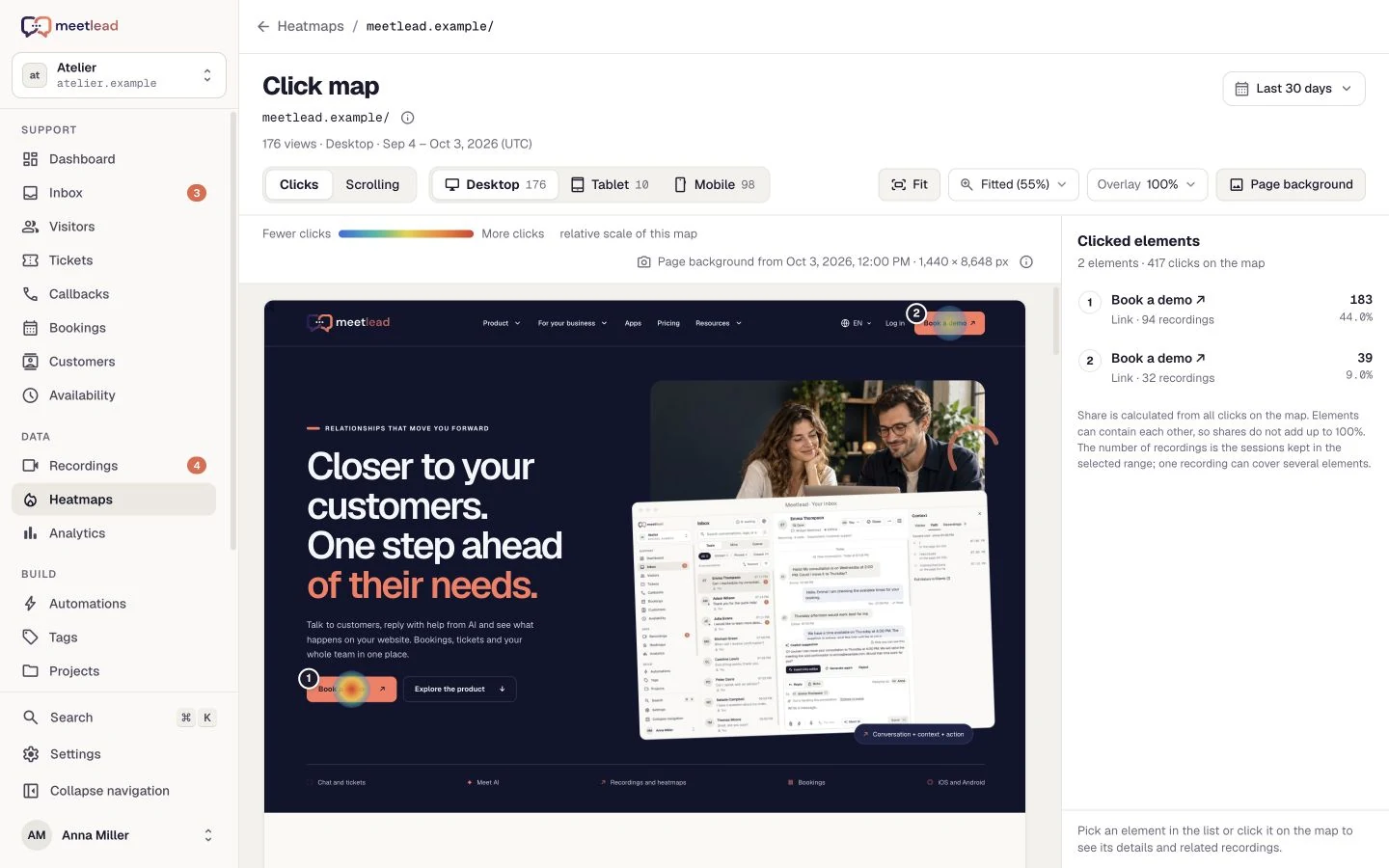
A heatmap is a good first step when your question concerns the layout of a specific page and whether behaviour repeats. It is useful, for example, when you want to compare interest in two CTAs, find elements that look clickable or assess how far visitors scroll through a long offer.
- Page hierarchyAre important elements noticed in the order the design intends?
- False affordancesDoes an image, heading or card attract clicks even though it has no action?
- Content lengthIs an important section beyond the point reached by a substantial share of visits?
- Device differencesDoes the mobile pattern differ from desktop after the order and width of elements change?
Do not judge a map by colour alone. Always check the device, URL and layout version. You will find the detailed process in our guide to reading heatmaps without guessing.
A heatmap can also be more convenient when you do not need the detail of an individual visit. If you are only asking about a section’s position or the relative popularity of elements, starting with replays may provide more data than the decision requires. The aggregate view lets you narrow the area first and only then decide whether closer observation is justified.
…you want to find a place worth investigating more deeply, rather than replay a single problem step by step.
Scroll the preview sideways or enlarge it to see the details.
When is a session recording the better place to start?
Choose a recording when sequence matters. You may be investigating a form error, movement between several pages, a return to the same section or a situation in which someone opened the chat after a series of actions. A replay lets you see what happened before and what came next.
This is especially useful when you already have a specific signal: a customer report, a drop at one stage, an unusual click or a conversation that begins with a recurring question. You are not browsing random visits in that case. You select sessions from the right page, device or time and look for a common sequence.
One recording is the story of one visit, not a representation of every user. It may reveal a technical error that does not need statistical proof, but it is not enough to conclude that every customer fails to understand the pricing page. We describe a practical way to select material in our article on how to analyse session recordings.
Before pressing play, decide what you are looking for and when you will stop watching. A recording may be long, but the relevant fragment usually concerns a specific page or event. Markers for clicks, URL changes and activity help you jump to important moments. They do not remove the need to take brief notes that separate fact from interpretation.
Recordings also require deliberate choices about data scope, masking and access. A separate guide to session recording and the GDPR describes the questions worth discussing before enabling this feature.
How can you combine heatmaps and recordings without wasting time?
The most common mistake is to open the list of recordings and watch the first ten visits. A better process resembles working with a map and a magnifying glass: first locate the area, then inspect the detail and finally return to the overall scale.
- Name the decision.For example: should information about free implementation be moved on the pricing page?
- Find the pattern on the map.Separate mobile and desktop, then examine scroll depth and clicks around the section in question.
- Select matching recordings.Watch visits from the right device and page, preferably ones that contain the event you are interested in.
- Record observations without interpretation.‘Three people returned to the table’ is an observation. ‘They did not understand the plans’ is already a hypothesis.
- Check questions from conversations.A recurring question in chat or a callback may give the behaviour specific context.
- Make one change.Decide after what period and using which signals you will assess whether the hypothesis was correct.
Meetlead brings click and scroll maps, session recordings and contact history together in the same profile. This does not mean the system knows the visitor’s intent. It makes it easier to move from a pattern to a visit and a customer question without assembling the context from several separate places.
The pattern from a map and the sequence from a recording in the same customer profile. Explore behaviour analytics.
Decision matrix: which view should you start with?
Scroll the table sideways to see all columns.
| Question | Start with | Next step |
|---|---|---|
| Do users reach an important section? | Scroll maps | Recordings with short and long scroll depth |
| Why did the form behave unexpectedly? | Session recordings | Check the error and its scale in quantitative data |
| Which CTA is chosen more often? | Click map | The destination goal and traffic quality after the click |
| What happened before the chat was opened? | Recording and activity timeline | The conversation content and similar visits |
| Does the problem affect many people? | Aggregate data and a heatmap | Purposefully selected recordings for context |
A heatmap identifies the place. A recording shows the sequence. A conversation verifies some of the assumptions. None of these sources should pretend to provide the complete answer on its own.
If you are just getting started, choose one important page and one question. This helps you avoid both browsing colourful maps without a purpose and watching hours of random sessions. The tool should shorten the path to a decision, not create a new queue of material to review.