
In a clinic, the phone always rings at the worst possible moment—in the middle of a treatment, appointment, or conversation with someone already there. The person expected to answer is usually the same person currently working with a patient. Online booking does not solve this merely by providing a form. It works only when it handles specific matters from start to finish and honestly leaves the rest to a person.
Why the phone is the most expensive channel in a clinic
In a company with a separate office, a phone call costs the time the conversation takes. In a clinic, it costs much more because you pay with treatment time, not registration time. Every answered call interrupts work. Every missed call leaves an absence: no message, no case number, and no way to return the next day with a meaningful answer.
- The interruption costs more than the conversationA three-minute call costs three minutes only on paper. In practice, it breaks the rhythm of work with the person sitting in front of you.
- Peak calls coincide with peak appointmentsPeople call in the morning and early afternoon—exactly when the clinic is busiest.
- A missed call leaves no useful traceOnly a number remains, with no case. Calling back blind creates another conversation that must start from the beginning.
- Most calls consist of three sentencesWhen, how long, and how much. That information can be presented without involving a person.
The first question is therefore not ‘how can we answer faster?’ but ‘which conversations do not need to happen at all?’ We discuss when text beats the phone in services—and when it does not—in our guide to customer contact in a service business.
What online booking genuinely handles—and what it cannot
The most common implementation mistake is assuming the phone will fall silent because the calendar is online. It will not. Self-service handles matters with a finite set of fields and one correct answer. Anything requiring judgment stays with a person, and it is better to plan for that immediately than discover it after a month.
Scroll the table sideways to see all columns.
| Matter | Can the customer handle it alone? | Why |
|---|---|---|
| Booking a standard appointment | Yes | Service, time, and contact details form a finite set of fields |
| Rescheduling for another time | Yes | It requires an available slot, not a specialist's judgment |
| Canceling an appointment | Yes | The fewer the steps, the more often the slot returns to availability |
| Asking about price and duration | Yes, if they are described with the service | Missing this information generates the most calls |
| Choosing the right service for an unusual matter | No | This requires a substantive conversation, not a time selection |
| A matter concerning someone's health | No | A text channel is not the right place for it |
| Payment, invoice, or document | Partly | A ticket describing the matter works better than waiting on the line |
The first three rows usually account for most registration traffic. Once a form handles them, the phone stops being the first-contact channel and becomes the channel for exceptions—a completely different number of daily interruptions. The configuration mechanics, including buffers between appointments, capacity, schedule exceptions, and approval modes, are common across industries and covered separately in our guide to an online booking system.
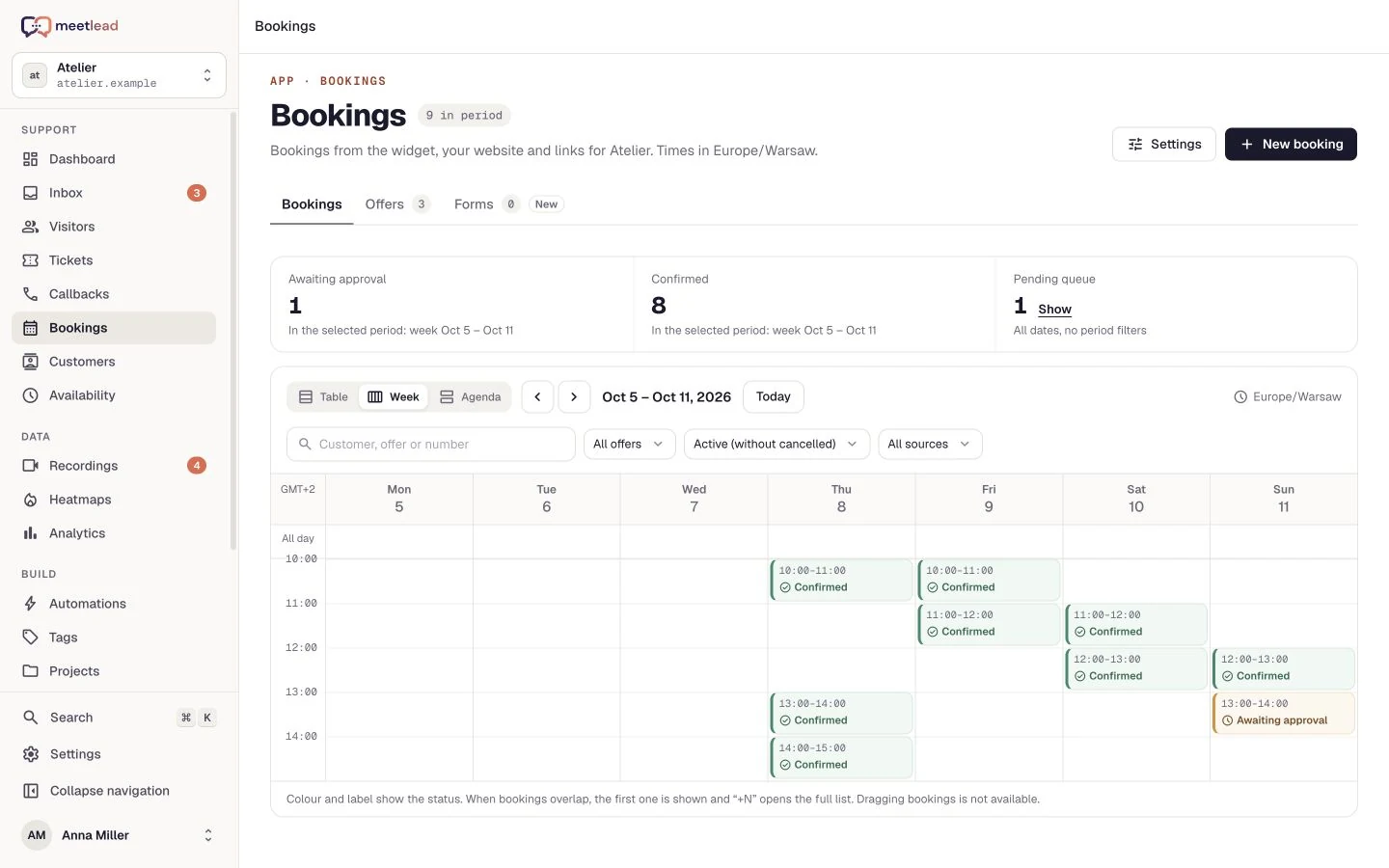
Each service has its own duration, buffers before and after, and a daily schedule with multiple windows. Show us a week at your clinic, and we will see whether it can be modeled. Schedule an implementation.
Scroll the preview sideways or enlarge it to see the details.
Cancellations: how to return a slot to availability
A missed appointment has a direct cost: the hour is blocked, the specialist waits, and someone else has just been told there are no available times. There is also a less obvious point: most such situations are not caused by bad intent. They happen because canceling was harder than not showing up.
If the only way to cancel is to call registration during its working hours, some people simply will not have time or will not feel comfortable calling. The same person would click ‘cancel’ in two seconds if the option existed. Design this part around good intentions and remove friction instead of adding reminders about obligations.
- State the rules before confirmation, not after.Explain when someone can cancel without consequences and what happens later. This is information to give before booking, not terms to hunt down.
- Provide an after-hours cancellation path.People realize in the evening or at the weekend. If they cannot act then, Monday's slot is lost.
- Send reminders early enough to change something.A reminder one hour before leaves no chance for anyone else to take the slot. A reminder one day before does.
- Offer rescheduling, not just cancellation.Some people do not want to cancel; they simply cannot attend at that time. Showing the nearest available times saves the appointment.
- Return a canceled slot to availability immediately.If the freed hour appears in the calendar only after a manual status change, the chance to fill it disappears.
In the Meetlead panel, changing a booking's status, rescheduling, and adding an appointment made by phone all happen in the same calendar. Message templates let you send a confirmation or change notice without rewriting it. This does not replace a decision about cancellation rules, but it makes carrying out that decision take seconds instead of a separate call.
The guide to online booking cancellations covers the path from the customer’s link to the slot becoming available again. Define a separate process for requests after the cancellation deadline. Write that deadline, together with your late arrival and no-show rules, into an appointment cancellation policy clients see before booking.
What not to collect in chat—and how to say so
A text channel has one particular characteristic in a clinic: people write things they should not send there. A description of symptoms, a photo of a skin lesion, an identity-document number, or treatment history. Not because they are careless, but because the chat window looks like a place to describe their matter—and their matter happens to be medical.
The answer is not an instruction for the team in case someone does this. It is a channel design that does not invite such content. Chat and the booking form should establish an appointment. Discussion of what brings the patient in should happen during the appointment or by phone. A vet practice has one more boundary to draw, because an animal emergency should never land in the chat; the guide to separating vet emergencies from routine enquiries shows how.
- Do not ask for a description of symptoms or the reason for the visit in the booking form's text field.
- Do not encourage people to send photos or scans in the chat window.
- Do not collect an identity-document number while scheduling an appointment.
- Do not ask follow-up questions about health in chat, even with good intentions.
- Name fields so they lead toward an appointment: service, day, time, contact.
- If you leave a notes field, describe it as being for organizational information, such as access directions or a preferred time.
A useful sentence for the team is: ‘We arrange the appointment here and will discuss the details in person.’ It is short, does not shame the other person, and moves the conversation where it belongs. We explain what to do when someone has already pasted something in our step-by-step article about sensitive data in chat.
Under the GDPR, health data is a special category of personal data subject to separate processing rules. This article concerns only the organization of contact and appointment booking. It is not legal or medical advice and does not determine what your organization may process. Establish your obligations, legal bases for processing, and required documents with a lawyer or data protection officer. Meetlead is not a medical system, does not maintain medical records, and is not intended for processing health data.
Regardless of conversation content, configure two things separately: masking form fields in session recordings and a retention period suited to how long the data is genuinely needed. Both are configurable and set once. We collected the rules common to every channel in our article on live chat and the GDPR.
Field masking in recordings, the scope of required booking data, and the retention period. We can review them together during implementation. Contact us.
First versus follow-up appointments: different needs, different channels
Treating every inquiry identically is the costliest simplification a clinic can make. A first-time patient has questions a calendar cannot ask: is this service right for me, how long will it take, do I need to prepare, and what will I actually pay? Someone who has visited five times wants only an available slot and will abandon the process at the third question.
- First contact
Questions about scope and price. A conversation or callback helps here
- Booking
Choosing a service and time, with minimal contact details
- Before the appointment
Confirmation and a reminder with a simple cancellation path
- Follow-up appointments
Just the calendar. No questions, no queue, no conversation
The practical conclusion is that your website needs two paths at once: a calendar for people who know why they are coming and a conversation path for those who do not. A callback request with a choice of convenient time works better for a clinic than calling registration, because the clinic decides when to call. We describe it in our article about website callbacks.
Outside working hours, both paths should lead to something persistent. Offline mode turns a conversation into a ticket with contact details, so an evening question does not disappear with a closed tab but waits on the case list in the morning.
An implementation plan for a clinic
A clinic implementation differs from an office implementation in one respect: no one can work on it during working hours. Order therefore matters, and it is worth starting with what produces an effect after the first week.
- List the five most common reasons for calls.For one week, note why people call. The list will be shorter than expected, and it defines the implementation scope.
- Describe services with their duration and price.Missing these two pieces of information is the single most common cause of an avoidable call.
- Model a real week, not opening hours.Include breaks, shorter days, and time between visits. Set buffers according to how long preparing the room actually takes.
- Choose an approval mode.Automatic for repeat appointments and manual for first-time and unusual ones. The rule must fit in one sentence.
- Configure confirmation, reminder, and cancellation paths.These three messages determine how many empty slots you will have next month.
- Agree one sentence about channel boundaries with the team.Everyone gives the same reply when a conversation moves toward details that should not enter the chat window.
- The customer sees the price and duration before choosing a time.
- The schedule includes breaks, exceptions, and days off, not only opening hours.
- Appointments can be canceled and rescheduled without a phone call and outside working hours.
- A canceled slot returns to availability immediately, not after someone manually reviews the calendar.
- The form does not ask for the reason for the visit or any health information.
- Field masking in recordings and the data-retention period are configured deliberately.
- Someone calling after hours leaves a ticket instead of reaching silence.
- The team knows where to add an appointment booked by phone in the panel.
Bookings, callbacks with time slots, and offline mode in one widget, with a calendar and status changes in the panel. Schedule an implementation, and we will review your schedule together.
A final note about expectations: online booking will not stop the phone from ringing. It will make it ring for matters that genuinely require a conversation. That is enough for the person responsible for the phone to focus on the patient, and for an available calendar hour not to remain empty by accident.