
Live chat automation makes sense when it shortens the path from a signal you notice to help that is genuinely useful. It should not bombard every visitor with the same message. The best rules are narrow: they apply to a specific page, behavior, or stage of the visit, and their impact can be evaluated later. Before building them, it helps to understand the basics of user behavior analysis. Without context, even a technically correct trigger can appear at the wrong moment.
Automation is a rule, not an autopilot
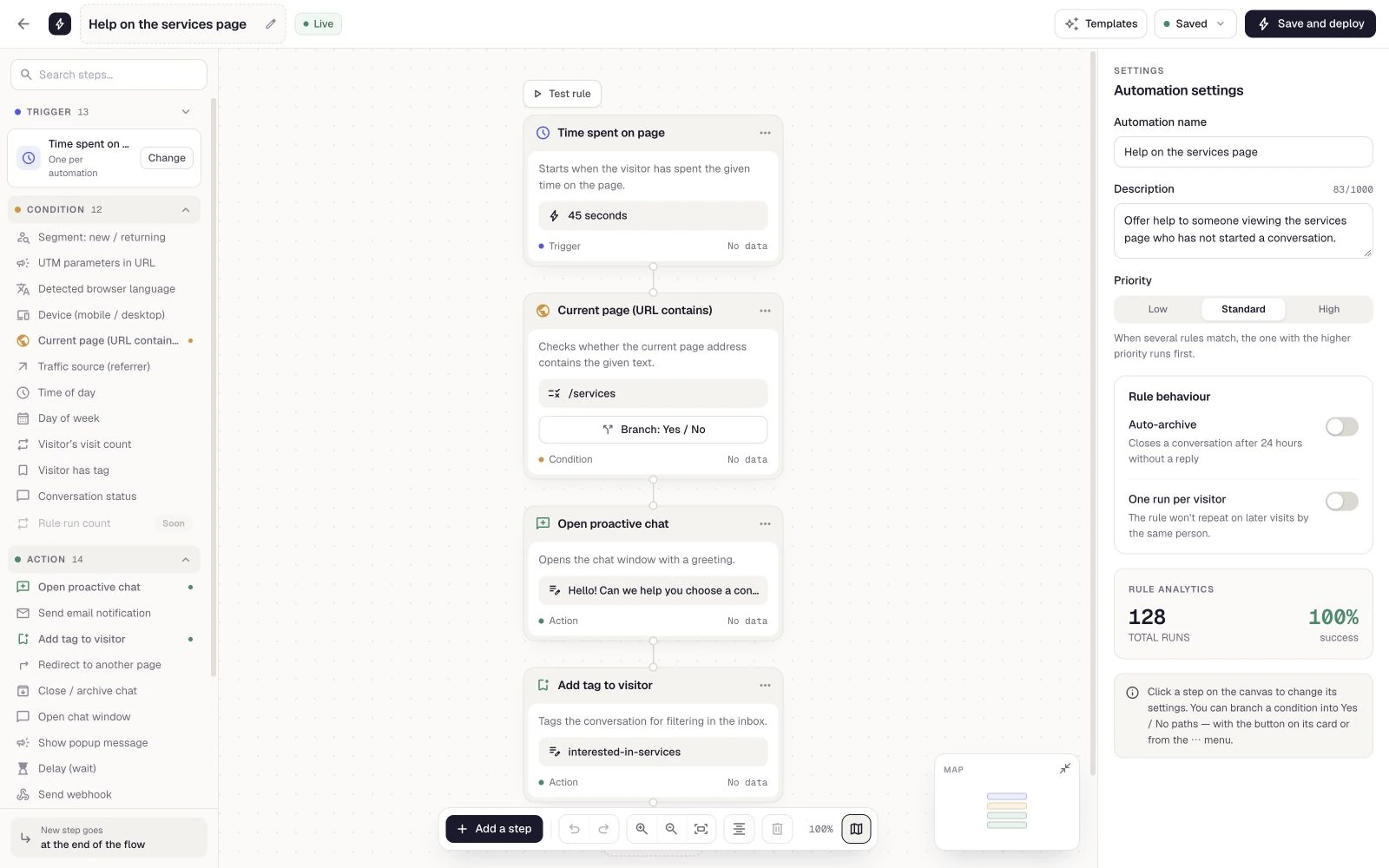
The simplest scenario has three parts: a trigger that starts the evaluation, conditions that narrow the audience, and an action to be performed. For example, a user visits the pricing page, spends a set amount of time there, and does not have the chat open, so they receive a brief invitation to talk.
It is still a rule configured by a person. It does not guess the customer's intent or write replies. Its only job is to choose the moment and carry out a planned action: display a proactive message, open the chat, show a popup, add a tag, send an email, redirect the user, or—after a delay—move to the next step.
Does this automation help the customer take the next step, or does it merely satisfy the company's desire to display something?
Scroll the preview sideways or enlarge it to see the details.
Signals worth starting with
Meetlead supports triggers based on the URL visited, time on page, clicks, scroll depth, exit intent, first or returning visits, number of pages viewed, and chat and callback events, among other things. Not every signal deserves its own automation.
- URL and timeA good starting point for high-intent pages, once the user has genuinely had time to review the content.
- Scroll and clickUseful when the response should appear only after someone reaches a specific section or uses an element.
- Return visits and visit countThese help distinguish an initial look at the offer from a later return to the same page.
- Conversation eventsOpening the chat, sending a message, or requesting a call can trigger tagging and help organize follow-up.
Conditions let you refine a scenario by device, traffic source, UTM parameters, language, time and day, visitor type, current page, visit count, tag, or chat status. Instead of combining everything at once, choose one strong signal and no more than two conditions.
Before building a rule around a signal, check whether that signal actually predicts an outcome. We explain how to choose such events in our article about website micro-conversions.
10 scenarios with a clear purpose
- Help on the pricing page.Trigger: time on page or a specific scroll depth on the pricing URL. Condition: the chat is closed. Action: a brief proactive message asking whether the visitor would like help understanding the differences between options.
- Offer contact before exit.Trigger: exit intent on an important page. Condition: the user has not started a conversation. Action: a popup offering the option to open the chat or request a call—without blocking the exit.
- Returning visitor.Trigger: returning visit. Condition: it is a repeat visit to a selected URL. Action: a discreet invitation to continue the conversation rather than a greeting written for a first-time visitor.
- First visit to the implementation page.Trigger: first visit and a specific URL. Action: a small popup explaining the next step. Do not open a conversation immediately—a new visitor should be able to read the page in peace first.
- Click on an integration question.Trigger: a click on a selected element. Action: open the chat with a short offer to check the customer's platform, or add a tag that helps the operator identify the topic.
- Third offer page.Trigger: page count. Condition: the visitor has viewed product pages but has not started a conversation. Action: a light message offering to compare what is included, without obscuring the page.
- Deep scroll to implementation requirements.Trigger: scroll depth on a long page. Action: show a question tied precisely to the section the user has reached instead of a generic “How can we help?”
- Chat opened without a message.Trigger: chat opened, followed by a short delay. Condition: no message received. Action: one sentence suggesting what information is available—with no series of follow-up prompts.
- Organize the conversation after the first message.Trigger: message received. Action: add a tag, send an internal email, or send a webhook to the appropriate process if the plan and configuration include that feature.
- Confirm a callback request.Trigger: callback requested. Action: label the request, notify the right person, and pass the event through a webhook when needed. A person still makes the call according to the schedule.
The first scenario pairs well with our guide to adding live chat to a website. If a customer prefers contact at an agreed time, it is worth designing a website callback option in parallel instead of trying to push everyone into an immediate conversation.
Rules based on the URL, time on page, scroll depth, and return visits—with frequency limits. Explore contact channels.
Match the response to the strength of the signal
The weaker the signal, the lighter the response should be. Simply landing on a page rarely justifies opening a window automatically. Time combined with scroll depth may justify a small message. A callback request or sent message is an unambiguous signal and can trigger tagging or a team notification.
Scroll the table sideways to see all columns.
| Situation | Light response | What to avoid |
|---|---|---|
| First page visit | No response or a subtle launcher | Opening the chat immediately |
| Extended review of the pricing page | One question about the information they need | A generic “How can we help?” with no context |
| Exit intent | Optional choice between chat and phone | Blocking the page and showing multiple popups |
| Message sent | A tag or email to the right person | More promotional messages |
Redirecting, opening or closing the chat, and showing a popup alter the user experience more directly, so they should be used with greater care. A webhook can pass an event to another system if the plan includes this feature, but its use should follow from a specific process, not from a desire to collect everything.
The most intrusive of these responses is a window that covers the content. Before using one, calculate its full cost rather than looking only at the number of sign-ups—we break this down in our article about website popups.
The most technical of these actions sends data to an external system. Our guide to integrating chat with a CRM explains what is worth sending and what can go wrong along the way.
Safeguards: frequency and context
Even a well-timed message becomes annoying if it returns on every page. Decide whether the response should occur once per visit, only after a return visit, or only while the chat remains closed. Do not run several automations that compete for the same person's attention. Priorities help establish the order, while draft, live, and paused statuses make it easier to prepare rules safely.
Do not measure only the number of triggers. Check how many users opened a conversation, replied, requested a call, or moved on to the next step. A high number of impressions with no response may mean the timing or content is wrong. Immediately dismissing the message is also a negative signal. If the content is the problem, our guide to live chat greetings tailored to the page type has examples and a simple way to compare variants.
Response wait time is another metric worth adding. A rule that approaches visitors outside staffed hours can improve the number of conversations started while making service performance worse. We explain how to measure this reliably in our article about first response time in live chat.
Keep a simple change log: rule name, launch date, segment, message content, and expected outcome. If you change both the condition and the message at the same time, you lose the ability to identify what affected the result. It is better to start with one version, collect enough visits, and then improve a single element. Factor in team availability as well—automation that encourages a conversation should not behave the same way when no one is available to respond.
First compare responses with on-site behavior. In a conversion audit, automation should be one hypothesis to test, not a substitute for fixing unclear content.
A plan for your first automation
- Choose one page and one customer question that genuinely recurs in conversations.
- Choose a trigger tied to behavior, not just a page view.
- Add no more than two conditions to limit accidental triggers.
- Choose the lightest action sufficient to achieve the goal.
- Write a message that refers to where the customer is on the site.
- Check for conflicts with other rules and set a priority.
- Run the scenario for a limited period and define the success metric before launch.
A good first automation is small and easy to turn off. If it helps start valuable conversations, you can expand it gradually. If it does not work, check the signal and context first instead of adding a more aggressive message. Review active rules once a month as well, and disable any that no longer match the current website or team process. Automation should make human-to-human contact easier—not increase the number of messages at any cost. If you want to choose a first process beyond chat rules, use the scoring in our guide to small business process automation.
If the rule is meant to encourage visitors to leave their details, first check the form you are sending them to. The number of fields and the message shown after submission usually matter more than the moment you initiate contact—we cover this in our guide to website contact forms.