

Website live chat is a real-time conversation channel between a visitor and a person at the company. It delivers the greatest value when a customer has a specific question before making a decision and the team can answer knowing which page the customer is viewing and where they are in their journey. It is not, however, a machine for ‘increasing conversions.’ Without organization, it can promise immediate help that the company does not actually provide.
First, decide why you are launching live chat
Choose a tool by starting with the customer's situation, not the length of its feature list. A store answering questions about availability needs a different kind of chat from a B2B company whose visitors compare service packages and want to discuss implementation. Write down three types of conversation that should reach the team and identify who is responsible for answering each one.
- Before purchaseQuestions about a variant, timing, compatibility, or the scope of a service.
- During a taskHelp when a user gets stuck on a form or at an important stage.
- After purchaseContact about an order, account, or follow-up support.
- Outside business hoursCollecting a message or offering a scheduled phone call.
If questions are complex and depend on a particular customer's situation, a conversation with a person usually makes more sense than a rigid script. When simple, recurring issues dominate, compare the roles of each channel in our guide to live chat, chatbots, and callbacks.
What should customers be able to do if the team does not respond within a few minutes? Answer this question before choosing the widget's appearance.
For a team of one or three people, deciding what deliberately not to enable matters more than the feature list. We discuss that decision in our guide to customer service in a small business.
Before calculating the benefits, calculate the cost — and that means more than the subscription. We break down the full cost in our guide to how much live chat costs.
Which criteria genuinely matter?
You can change the chat bubble's color later. It is harder to fix missing history, unclear conversation handoffs, or a situation where an agent does not know what the customer is looking for. When comparing tools, examine the entire workflow.
Scroll the table sideways to see all columns.
| Area | What to check | Why it matters |
|---|---|---|
| Conversation | Message history, read status, typing indicator, and archiving | The customer and agent know whether the conversation is active and can return to its context |
| Team | Shared inbox, search, ownership assignment, and tags | Conversations do not get lost among employees' private accounts |
| Context | Current page, previous visits, and identified customer details | The agent does not have to begin by asking, ‘Where is the problem?’ |
| Availability | Online status, schedule, and widget behavior outside business hours | The promise made in the widget matches the team's real availability |
| Installation | Embedding method, allowed-domain list, and the script's impact on the website | Implementation remains controlled and can be tested before publication |
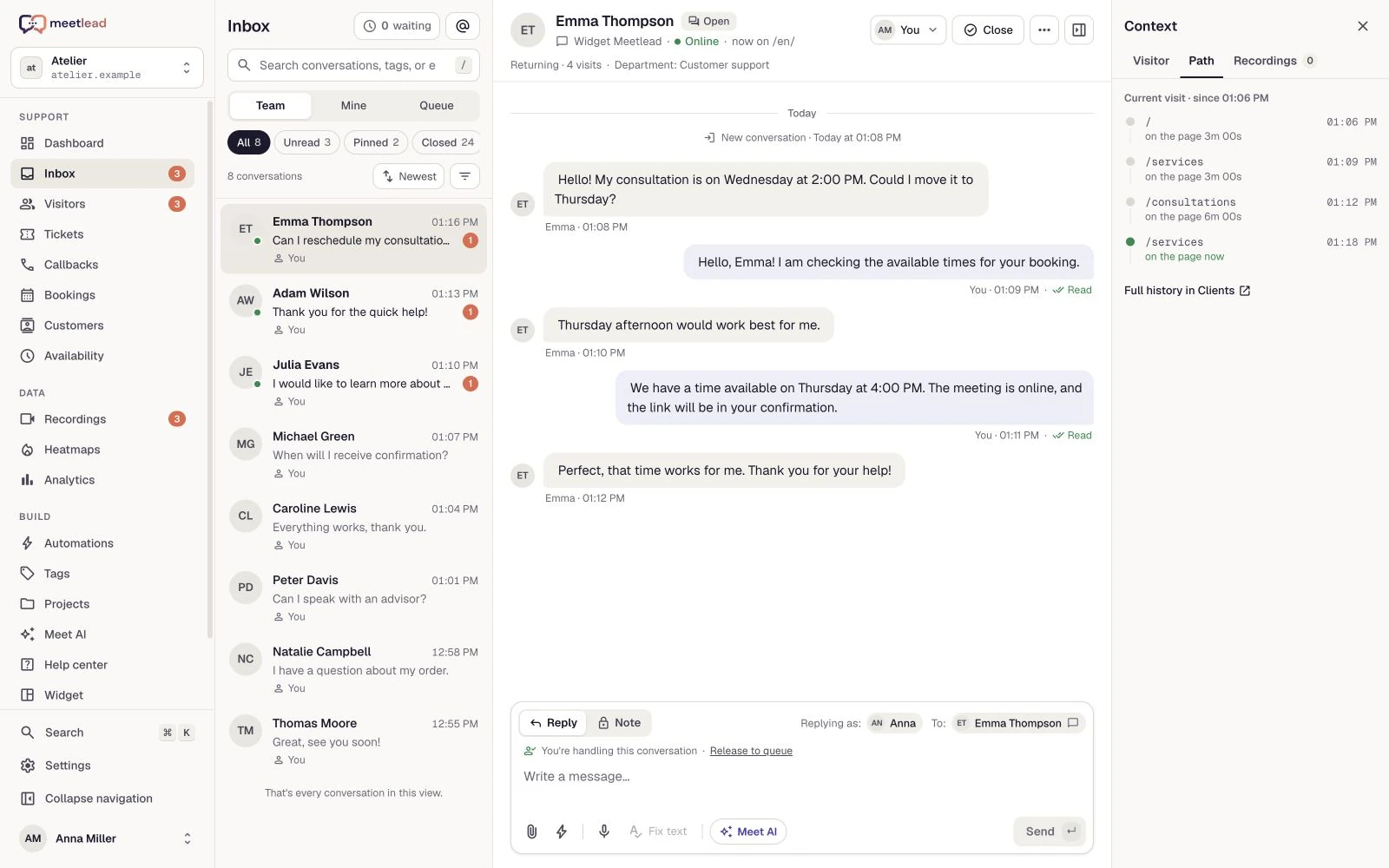
Meetlead stores conversation history, read statuses, typing information, and visitor availability. The team works from a shared inbox where it can search, tag, pin, and archive conversations. A customer profile can connect contact details with activity on the website. These are product features; their value still depends on whether the company defines a support process.
Before deciding, also test the daily workflow with a sample conversation. Can a new team member identify which tickets are waiting for a reply? Can they return to an older thread without searching private inboxes? After a conversation closes, is it clear who should take the next step and when? A demo should cover more than the customer's view: it should also show an agent taking ownership, searching, tagging, and reopening a contact.
For a broader view of how to connect conversations with behavioral data, see our pillar article on website user behavior analysis.
If some traffic comes from outside Poland, add support for a second language to your criteria — both in the widget and on the team. We explain when this step makes sense in our article on multilingual customer service.
An implementation plan without technical chaos
You can embed the Meetlead widget on a website with a script containing the client ID. This technical step is short, but publishing the code should not come first. Prepare the content, permissions, and test scenarios before you do it.
If the website runs on WordPress, you can complete the technical step from the dashboard without pasting code into the theme. We discuss installation, consent settings, and the widget's effect on performance in our guide to adding chat to a WordPress website. Regardless of how you embed it, decide in advance what data the conversation will create; the checklist in our article on live chat and GDPR will help.
- Choose the initial pages.Start with pricing, forms, and product or service pages — places where a question has real value.
- Assign conversation owners.Define who responds, when they hand a case over, and how they mark a conversation that requires follow-up.
- Configure online and offline states.The widget's text should state honestly whether an answer will arrive now or later.
- Test the full journey.Send a message on both mobile and desktop, then test the notification, reply, read receipt, and return to the conversation after refreshing the page.
- Launch with limited scope.Observe real questions, improve the copy, and only then extend the widget to more pages.
If a customer prefers a phone conversation or the team does not monitor the inbox continuously, a natural complement is a website callback with time-slot selection. Both channels should lead into one clear support process.
Configure the widget, availability schedule, and offline mode in one dashboard. Schedule implementation — we will guide you through the configuration.
Rules that keep chat helpful
Even the best configuration cannot replace simple operating rules. Set an expected first-response time during business hours, decide how conversations are assigned, and define when an agent should suggest a phone call. Do not promise ‘we respond immediately’ if coverage is only occasional.
Visit context should help shape the answer, not lead to messages that make customers feel watched. Instead of writing, ‘I see this is your third visit to our pricing page,’ ask, ‘Can I help you compare the options?’ Behavioral information is a tool for the agent, not something that must be demonstrated to the customer. Ready-made first lines like this for pricing, booking and order pages are collected in our live chat greeting examples.
Automated messages also require restraint. A rule based on a visited URL, time on page, or scroll depth can start a conversation at the right moment, but it needs a frequency limit and a sensible condition. We provide examples in our guide to behavior-based live chat automation.
It is also worth planning what happens after the conversation. A short service rating takes customers a few seconds and gives the team a signal that response-time statistics cannot reveal. We discuss the approach in our article on customer satisfaction surveys.
If the agent is offline, offer the option to leave a message or schedule a phone call. The widget's status should reflect real availability, not a marketing promise.
Decide separately how much information to collect before a conversation. We describe the minimum needed to assess an inquiry in our article on website lead qualification. Which fields to show in the widget itself, and when to skip the form, is covered in our guide to pre-chat form questions.
Scroll the preview sideways or enlarge it to see the details.
Common mistakes and a pre-launch checklist
The most common mistake is treating live chat as decoration. The widget appears on every page, but no one is on duty, its messages are generic, and questions reach an inbox with no owner. The second problem is opening the window too aggressively, before users have time to understand the offer. The third is failing to measure conversation quality and recurring questions.
The last of these mistakes is the easiest to fix because it takes only one well-defined metric. We explain how to measure customer wait time without making the report improve faster than the service itself in our article on first response time in chat.
- The purpose of chat is written in one sentence and known to the team.
- Every shift has an owner and backup coverage for absences.
- The stated hours and response time match reality.
- The offline state offers a useful next step instead of a dead end.
- The widget has been checked on mobile, desktop, and key pages.
- The team knows when to answer in chat and when to offer a callback.
- Once a month, you review recurring questions and improve the website.
A well-implemented live chat is not about maximizing the number of open windows. It should shorten the path from a customer's doubt to a helpful answer and give the company the history and context needed for follow-up support.
If you are considering a migration rather than your first implementation, there is a separate set of questions about exports, retention, and what remains after disconnecting the current tool. We collected them in our guide to changing customer service systems.
It is also easy to judge the channel too early after launch. We explain what to watch in the first few weeks and what can wait in our article on the first month after implementation.



