

AI implementations in customer service rarely fail because of the model's quality. More often, they fail because three decisions were never made: where the model gets its knowledge, who clicks “send”, and when the conversation is handed to a human. Without them, you get an assistant that sounds authoritative and is confidently wrong—and those mistakes return as complaints.
What AI really changes—and what it cannot change
AI is good at repetitive, language-based chat tasks: summarizing a thread, drafting an answer to a frequently asked question, turning a terse note into a clear sentence, or finding the relevant clause in a policy. It does not, however, know your current stock levels, what was agreed during the last phone call, or who was exceptionally promised a discount.
Scroll the table sideways to see all columns.
| Type of case | Where AI usually helps | Where AI usually falls short |
|---|---|---|
| A factual question covered by the documentation | Finds the relevant passage and drafts an answer | When the documentation is outdated or contradictory |
| A question about an order's status | Guides the conversation and gathers the details needed to check | When it has no access to the system containing the actual status |
| A custom quote | Gathers requirements before a conversation with a human | When it tries to quote a price that no one has approved |
| A complaint or an emotional situation | Summarizes the thread for the operator | When it handles the conversation instead of a human |
| An out-of-scope question | Acknowledges that it lacks the information and hands the case over | When it invents an answer just to avoid leaving a blank |
This distinction has a practical consequence: AI does not replace the decision about which contact channels to offer. If you are wondering whether you need chat, a bot or a call request, start with the comparison in live chat, chatbot or callback. This article assumes that you already have a channel and are asking how to add AI to it.
A knowledge base is a prerequisite, not an add-on
A model without your content gives generic answers or invents details. A model with your content responds only as well as that content allows. That is why the first implementation stage is not configuring a bot, but organizing the material it should read.
- A single source of truthIf your pricing lives in three places and says something different in each, AI will pick one at random.
- Freshness over volumeTwenty current, accurate pages work better than two hundred pages containing last year's terms.
- ExclusionsArchived policies, drafts and internal pages should not become source material.
- Answers with sourcesIf you cannot point to the passage supporting an answer, it is better not to send it.
It is also worth deciding who refreshes the sources and how often. A knowledge base does not maintain itself, and the costliest AI errors are not hallucinations from nowhere, but faithful quotations from an outdated page. In Meetlead, the knowledge base is isolated for each website, supports files, URLs and sitemaps, and refreshing its sources is a deliberate administrator action rather than a background process.
Ask the system the twenty most common questions from the past month. If more than a few answers need correction, the problem is the content, not the model.
We explain how to collect and organize this material—and how to check whether it genuinely reduces the team's workload—in our guide to building a website knowledge base and FAQ.
If the correct information exists but the assistant cannot find it, work through chatbot source and answer-matching diagnostics. That is a different problem from an invented fact.
Who clicks “send”: an operator suggestion or an autonomous reply
This is the most important implementation decision, and it should be made deliberately rather than inherited from default settings. There are two sensible modes, and the difference between them is not the technology but how risk is distributed.
Scroll the table sideways to see all columns.
| Aspect | Operator suggestion | Autonomous reply |
|---|---|---|
| Who sends the message | A human, after reading and correcting it if necessary | The system, according to predefined rules |
| Risk of an incorrect answer | Low—the operator is the final filter | Real, and it grows with the range of topics |
| Time saved | Less time spent drafting responses | Coverage outside business hours and during traffic spikes |
| Required knowledge maturity | Moderate, because the operator can catch gaps | High, because no one reviews the answer before it is sent |
| A good time to start | From the first day of implementation | After several weeks of monitoring quality |
The sensible sequence is to begin with suggestions, then consider autonomy in a narrow, well-documented area. Starting the other way around can be tempting because it promises immediate savings, but it teaches customers that they cannot rely on answers from the chat. If you are considering a tool that is meant to carry out actions on its own, our comparison of AI agents vs chatbots covers the buying criteria, including accountability and undoing operations.
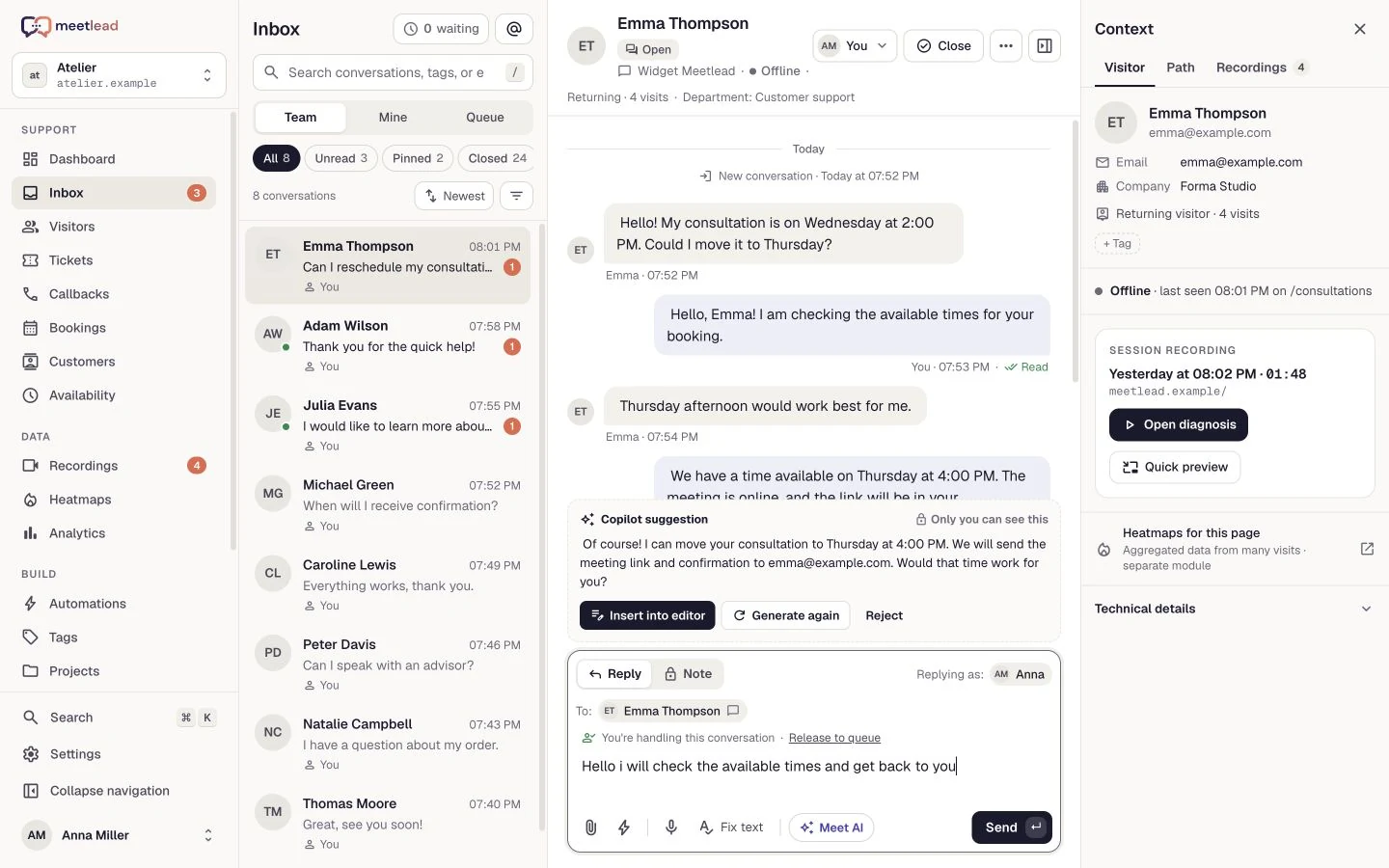
In Meetlead, Copilot creates a private suggestion visible only to the logged-in operator. The suggestion is never sent automatically—the operator can insert it into the editor, edit it and send it themselves, or reject it. The Autonomous handling and Hybrid modes, in which customers can choose to chat with the AI assistant in the widget, are a separate, explicit administrator decision, not a side effect of enabling the feature.
During a pilot, assess the suggestion before editing it so the model does not receive credit for the operator’s work. Use a fixed sample for evaluating AI Copilot answer quality.
Daily suggestion review needs a clear point at which a person sends the reply. The guide to approving AI Copilot answers sets out checks for facts, sources and permissions.
Before treating a chatbot reply as confirmation of an action, use the guide: Chatbot information versus action: when can you say it is done?.
Scroll the preview sideways or enlarge it to see the details.
The boundary: when a conversation must go to a human
Handoff to an agent is not a system failure; it is one of the system's functions. The problem is not that AI hands over a conversation, but that it does so too late or in a way that forces the customer to repeat the entire story from the beginning.
- No reliable source.If the knowledge base has no passage that answers the question, the right response is a handoff, not an attempt to guess the answer.
- A repeated question.A second attempt to phrase the same problem usually means that the first answer did not help.
- A high-stakes topic.Complaints, cancellations, payments and personal data should go straight to a human.
- An explicit customer request.“I want to speak to an agent” should work immediately, without a loop of follow-up questions.
- An emotional signal.A tense conversation rarely ends well in an automated channel, even when the substantive answer is correct.
- A handoff with context.The operator should see the full conversation and a summary of the case before responding.
It is worth deciding in advance what happens to a handed-off conversation outside the team's business hours. If no one is available, the customer should receive clear information and a practical alternative—a form or a callback request. We explain how to handle this moment in our article about website callbacks. If the assistant should answer only while your team is away, plan its scope and schedule with the guide to after-hours customer service with AI.
It is better to hand a conversation over one question too early than one question too late. An unnecessary handoff costs a minute of an operator's time. A late handoff can cost you the case and earn a poor review.
A suggestion visible only to the operator and sent only after they approve it. See the product.
Missing knowledge and an invented fact need different fixes. Review seven causes of chatbot hallucinations to decide what to check in the source and in the assistant’s behaviour.
Switching the conversation is not enough if the operator does not know the reason and prior agreements. Plan the context for a chatbot-to-human handoff and the next update to the customer.
Transparency with customers and honest impact measurement
A system pretending to be human is not a clever tactic; it is a reputational and regulatory risk. Customers will usually recognize the automation anyway, and the sense that they have been misled costs more than the automation delivers. A clear statement that an assistant is handling the conversation, together with a visible route to a human, is cheaper than explaining yourself later. Ready-to-adapt copy for the greeting, the assistant name and the route to your team is in the guide to AI chatbot disclosure.
Measurement requires equal care. The most common way these implementations distort the numbers is by counting an automated response as the first human response. The result looks excellent while the customer is still waiting. We explain how to calculate this honestly in our article about first response time in chat.
- The share of conversations resolved without human involvement, measured when the case closes rather than after the first response.
- The share of handoffs to an agent and the most common reasons for those handoffs.
- The number of cases that return within 48 hours with the same question.
- Customer satisfaction measured separately for conversations with and without AI involvement.
- A list of questions the system could not answer—a ready-made backlog for the knowledge base.
- Operator time per case before and after implementation.
The last point is often the most instructive. If AI handles many conversations but the team works just as much as before, the automation is probably taking over straightforward cases that were already quick to resolve while leaving the difficult ones unchanged. That can still be worthwhile, but it is better to understand the effect than to celebrate the number of messages handled.
The closed status and the actual customer outcome are different observations. The guide to AI support quality and resolved issues explains how to assess outcomes using samples and later contacts.
Roll out in stages instead of launching everything at once
- Week 1—organize your knowledge.Gather current sources, remove archived versions and list the twenty most common questions.
- Week 2—operator-assist mode.Enable suggestions for operators only and record how many require correction before they are sent.
- Week 3—fill the gaps.The gaps operators uncover are the best material for expanding the knowledge base.
- Week 4—limited autonomy.If you choose autonomous mode, start with one well-documented area and use it outside business hours.
- Every month—review.Review handoffs, recurring cases and unanswered questions. This is a lasting routine, not a one-off project.
This pace may look cautious, but it is usually faster than the “turn everything on and see what happens” approach, which is often followed by weeks of firefighting and rolling features back. We describe behavior-based automations that you can deploy alongside and independently of AI in our article about live chat automation.
Before making the assistant available to customers, work through 25 chatbot launch testing questions. Acceptance should cover missing answers and the handoff to a person as well.
After initial acceptance, keep a question set for later changes. Chatbot regression tests after a knowledge update distinguish an intended answer change from the loss of previously correct information.


